Trigger
Turn any audio signal into MIDI notes with velocity
These two Ableton devices let you turn any audio signal (drums, clicks, contact mic input, modular, etc.) into MIDI notes with velocity.
For example, hook up a contact mic anywhere on your drum kit, and use that to play a Drum Rack in Ableton Live.
The Devices
Trigger Send
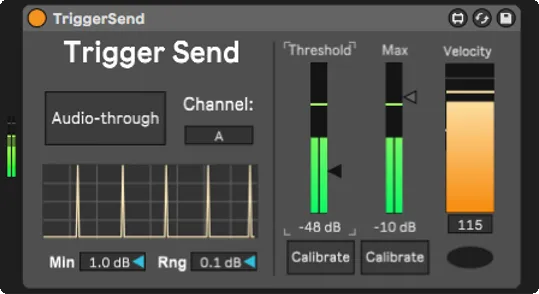
Put this on an audio track. It analyzes the incoming audio and sends trigger data whenever a transient crosses a threshold.
Controls:
- Threshold – How loud the sound must be to trigger
- Max – Sets the loudest expected hit (for velocity scaling)
- Min / Range – Fine-tune detection sensitivity
- Channel – Selects which Trigger Receive it talks to
- Calibrate – Automatically sets good Threshold / Max values
Trigger Receive
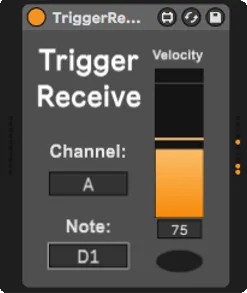
Put this on a MIDI track. It receives triggers and outputs MIDI notes.
Controls:
- Channel – Must match the Trigger Send
- Note – Which MIDI note to output (e.g. C1 for kick, D1 for snare)
Connect this to any Drum Rack, sampler, or synth.
Quick Setup
- Put Trigger Send on your audio track
- Calibrate Trigger Send (optional but recommended)
- Put Trigger Receive on a MIDI track
- Set both to the same Channel (A, B, C…)
- Choose a Note in Trigger Receive
- Route that MIDI track into a Drum Rack or instrument
That's it. Your audio now plays your instruments.
Calibration Guide
Proper calibration ensures reliable triggering and prevents false positives or interference between multiple triggers. This ensures the full velocity range (0-127) maps correctly to your playing dynamics.
Setting the Threshold
The Threshold filters out background noise and unwanted vibrations.
Best practice when using multiple triggers:
- Click the Calibrate button to enable threshold calibration mode
- Play all other triggers at their loudest (not the one you're calibrating)
- Click Calibrate again to lock in the threshold
This ensures other triggers won't cause false positives on this one.
Setting the Max
The Max value sets the loudest expected hit for accurate velocity scaling.
To calibrate:
- Click the Calibrate button to enable max calibration mode
- Hit this trigger at the absolute loudest you'll ever play it
- Click Calibrate again to lock in the max value
The device will learn the peak level and map it to MIDI velocity 127, giving you full dynamic range.